
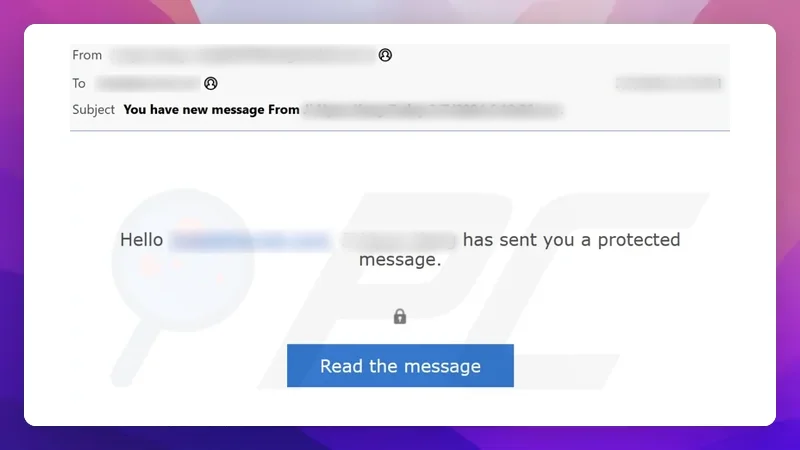
I'm writing this because scams have gotten a lot better this past year. AI can now write a perfect fake email from your billing service, your licensing board, or a client. The typos we used to look for are gone. And small practices are a common target, because attackers assume no one is watching.
The email above is one I got. It looks like a therapist I know sent me a secure message. It's a scam.
You already do a lot to protect your clients. You close the door. You lower your voice in the hallway. You think twice about what goes in a note. This guide is about giving your inbox, passwords, and devices the same protection.
Most of it comes down to a few habits. These are the ones I'd share with a friend. They apply whether you use Practicepicnic or not.
What has changed
Scams have been around forever. AI has made them cheap and convincing.
- Emails look real. AI writes in perfect English and copies the tone of real companies. Credential phishing jumped more than 700% in late 2024 as these tools spread.
- Fake login pages look real. A link can open a page that looks exactly like your email or your EHR. It exists only to capture your password.
- Voices can be copied. A few seconds of audio is enough to clone a voice. The FBI says Americans lost nearly $893 million to AI-enabled scams in 2025.
- Small practices get hit. This fall, a small therapy practice in Georgia reported a breach affecting about 2,000 people.
This matters more for therapists than for most businesses. You can cancel a stolen credit card. You can't take back a leaked therapy note.
Start with these three
If you only do three things this week, do these.
- Pause before you click. Treat any unexpected request to log in, pay, or act fast as fake until you've checked it another way.
- Turn on automatic updates on your computer and phone.
- Use a password manager and turn on two-factor authentication, starting with your email.
The rest of this guide explains each one.
Phishing: verify before you respond
Phishing is when someone pretends to be a person or company you trust. The goal is to get you to click a link, share a password, or send money. Most breaches start this way.
Here are a few I've gotten myself:
- A "protected message" from a therapist I know
- A wedding invitation from a therapist I know
- A document shared with me to review and sign
- A new voicemail waiting for me
- A warning that my mailbox was almost full
Each one had a link. If you clicked it, it asked you to sign in with your Gmail account. As soon as I saw that, I knew it was a scam. On a busy day between sessions, it would be easy to miss.
You can't spot phishing by its typos anymore. Look at what the message asks you to do instead.
Be careful when a message:
- Asks you to log in, verify your account, or reset a password
- Says something bad will happen if you don't act soon
- Involves money, like an unpaid invoice or new bank details
- Comes from someone you know but feels a little off
- Has an attachment you weren't expecting
What to do instead:
- Verify another way. Call the company at the number on its real website. Call a colleague at the number you already have.
- Don't log in from a link. Go to the site yourself or use a bookmark. Never enter your email password on a page you reached from a message.
- Hover first. On a computer, hover over a link to see where it really goes.
- Slow down. Urgency is a scammer's main tool. A real problem will still be there in ten minutes.
- Ask. Forward anything suspicious to a colleague, or to us if it claims to be from Practicepicnic.
If you do click something, don't panic. It happens to careful people. Change that password right away and follow the steps in "If something goes wrong" below.
Keep your software updated
Updates fix security holes. Once a fix is public, attackers go looking for devices that haven't installed it. CISA recommends installing updates right away.
Turn on automatic updates:
- Mac: System Settings > General > Software Update > Automatic Updates
- iPhone or iPad: Settings > General > Software Update > Automatic Updates
- Windows: Settings > Windows Update
- Android: Settings > System > Software update (varies by phone)
- Your browser: Chrome, Safari, Edge, and Firefox update when you restart them. Close and reopen yours now and then.
When your device is too old
Every device eventually stops getting security updates. It still works, but new security holes never get fixed.
- Windows 10 stopped getting regular security updates on October 14, 2025. Extended Security Updates can cover it until October 12, 2027, but you have to enroll.
- Mac: Apple generally supports the three most recent versions of macOS.
- Android: Check the "Android security update" date in Settings. If it's many months old and no update is offered, your phone is likely out of support.
If you can, replace any device that no longer gets security updates. That's not always possible right away. Until then, keep client work on a device that's still supported.
Use a password manager and two-factor
When a website is breached, its passwords often get sold. If you reuse a password, one breach exposes every account that uses it.
The fix is a different strong password for every account. A password manager makes that easy.
- What it does: It creates strong passwords, remembers them, and fills them in on your phone and computer. You only remember one master password.
- Good options: Apple Passwords, Google Password Manager, 1Password, or Bitwarden.
- Bonus: It won't fill your password into a fake site, because the address doesn't match.
- Where to start: Your email, your EHR, and your bank. Update the rest as you log in to them.
For your master password, use a few random words, like lantern-pickle-harbor-violet. It's easier to remember and harder to crack.
Then turn on two-factor authentication. Logging in then takes something besides your password, like a code from your phone. Even if someone steals your password, they can't get in.
- Start with your email. Password resets go there, so it's the key to everything else.
- Then your bank, payment processor, and other business accounts.
- Use an authenticator app or passkey when you can. Text message codes are still better than nothing.
- Never share a code. No real company will ask you to read one back.
Other good habits
Once the big three are done, work through these.
Phone calls
- Set a code word with anyone who handles money or records for you. Ask for it on any unusual call.
- If a caller asks for money or information, hang up and call back at a number you already have.
Your devices
- Use a screen lock, and set your computer to lock when you step away.
- Turn on Find My (Apple) or Find My Device (Google, Windows) so you can erase a lost device.
- Keep disk encryption on: FileVault on a Mac, BitLocker or Device Encryption on Windows.
- If you share a computer, use a separate user account for client work.
Wi-Fi
- Change your home router's default password.
- Use your phone's hotspot instead of public Wi-Fi for client work.
AI tools
- Don't paste client information into consumer chatbots. Use tools that sign a Business Associate Agreement (BAA).
- If you use an AI scribe, know where recordings are stored and for how long.
Vendors
- Any company that handles client information for you should sign a BAA. If you're not sure you have one, ask.
Paper
- Shred anything with client information. Lock up paper records.
Clients
- Tell clients how you will and won't contact them. For example: "I'll never ask you to pay through a link in a text."
If something goes wrong
Act quickly and stay calm.
- Change the password for that account. Change it anywhere else you used it too.
- Sign out of all other sessions.
- Turn on two-factor if it isn't on.
- Look for changes you didn't make, like new email forwarding rules or recovery phone numbers.
- Call the companies involved, like your bank, payment processor, or EHR. If it involves Practicepicnic, contact us and we'll help.
- Write down what happened and when.
- Get advice. If client information may be exposed, HIPAA has notification deadlines. Your malpractice or cyber insurance carrier is a good first call. You can also report scams to the FBI at ic3.gov.
This happens to careful people too. The faster you respond, the less damage it does.
Bottom line
You don't have to do everything at once. Pick one thing this week and start there.
If you have questions, or want a second look at a message that feels off, email us. We're happy to help.