
If you run a private pay practice on SimplePractice, there's a good chance you're paying for a lot you don't use. Claims, clearinghouses, ERA processing, payer enrollment — the insurance machinery is what makes SimplePractice's higher tiers expensive, and it does nothing for a practice that doesn't bill insurance.
Practicepicnic is an EHR built only for private pay practices. The short version of what we offer: everything SimplePractice has in its most expensive plan, minus direct insurance claim submission. We do generate out-of-network superbills, so clients who get reimbursed by their insurance are covered. Because we don't carry the claims complexity, we can keep the price low for the long term.
This article is what we send people who ask us about switching. It covers what Practicepicnic does, what it costs, and how our SimplePractice import tool moves your clients, notes, forms and files over. For most solo and small group practices, the whole switch takes a day. Larger group practices have more to move, so plan on about a week, most of which is waiting on exports rather than work on your end.
First, who we're not for
If you submit claims to insurance directly from your EHR, stay on SimplePractice. We don't do electronic claim submission and we're not planning to.
What we do support is out-of-network superbills. If your clients pay you and then get reimbursed by their insurance, you can generate superbills with the right codes and diagnoses and send them from the client portal. That's the extent of our insurance support, and it's the trade-off that lets us do everything else at our price.
Pricing
We have one plan and it includes every feature. There are no tiers to compare.
- $29/clinician per month
- $10/clinician per month for built-in telehealth (optional)
- 2.9% + $0.30 per successful card transaction (standard Stripe processing)
That's it. No setup fee, no contract, no per-client charges. Every practice starts with a free 30 day trial, no credit card required, and you can cancel anytime.
A quick tour
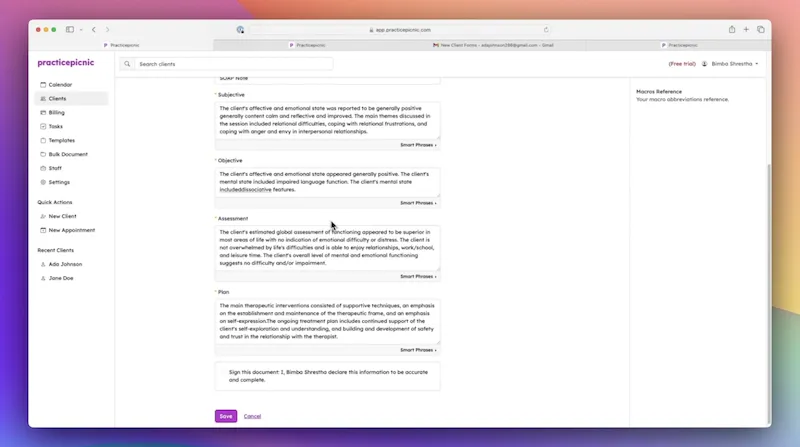
Here is a short walkthrough of the system. It's the same demo we give on calls.
What you get
If you're used to SimplePractice, nothing here will feel unfamiliar. The pieces are the same, they're just arranged more simply.
Scheduling and intake
A calendar that does what you expect: color coded by clinician or service, recurring appointments, drag and drop, and two-way sync with Google Calendar. Clients can request appointments online through your booking page, and reminders go out by email and text automatically.
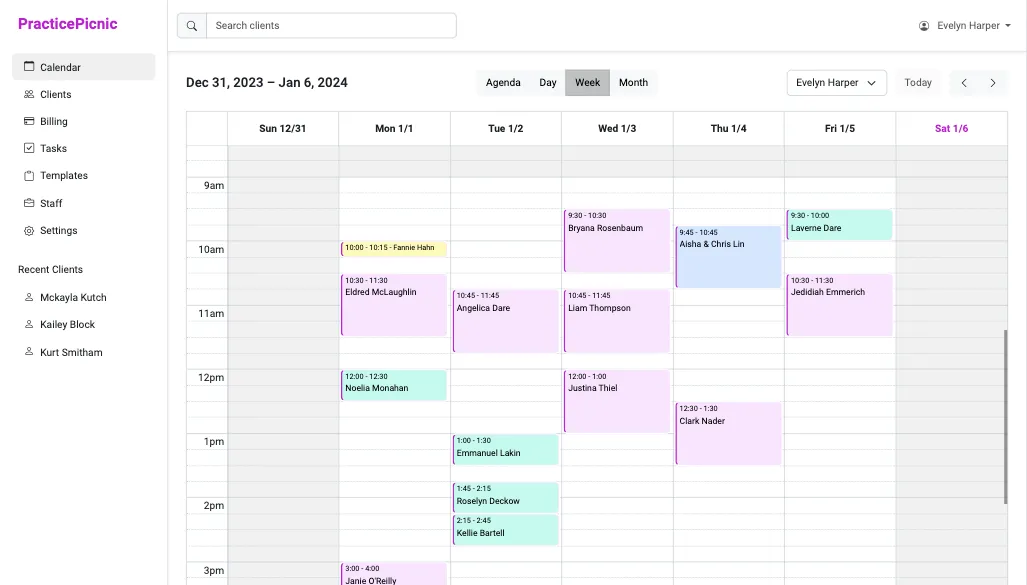
- Online appointment requests and booking links
- Email and text reminders that cut down no-shows
- Repeating appointments and clinician availability
Telehealth
Telehealth is built into the calendar. Start a session from the appointment, and your client joins from the link in their reminder. Nothing to install on either side, and it works for individuals, couples, families and groups. If you'd rather keep using Zoom, Google Meet or Doxy.me, we integrate with those too.

- HIPAA compliant video with screen sharing
- Multiple participants for couples, family and group sessions
- AI Notetaker can draft your note from the session
Documentation and notes
Progress notes, treatment plans, assessments and any other document type you need, all from customizable templates. Start from our template library or bring your own. The note editor supports macros and smart defaults.
The part people ask about most is the AI. Practicepicnic has a built-in, HIPAA compliant AI Notetaker that drafts your progress note from a session recording (in-person or telehealth) or from your dictation. You review, edit and sign. It's bundled into the $29 plan at no extra cost, not sold as an add-on.
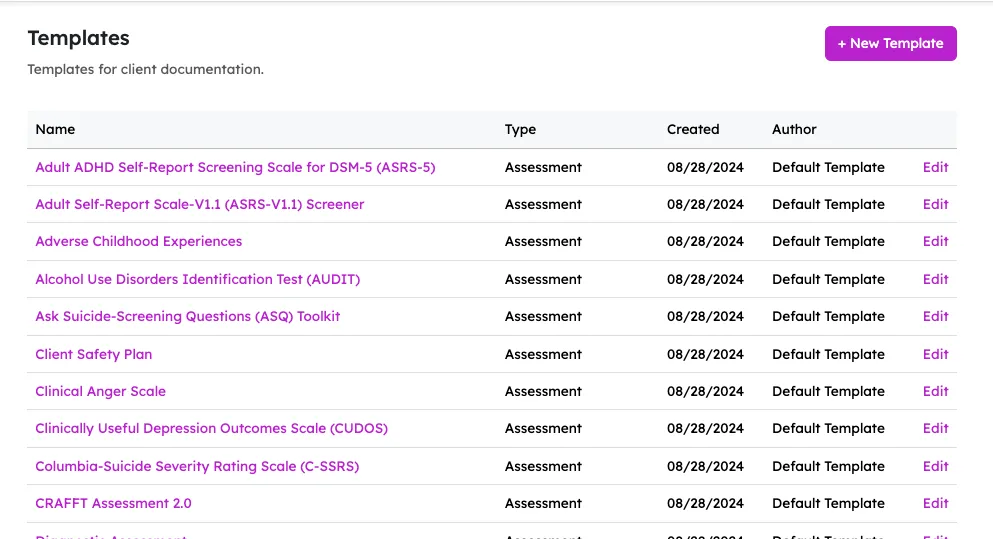
- SOAP, DAP, BIRP and fully custom templates
- Treatment plans with diagnoses, goals and objectives
- AI Notetaker included, no add-on fee
- Sign and lock notes; supervisors can co-sign
Billing and payments
Store cards on file, charge automatically after each session, and let clients pay invoices from the portal. Superbills are generated with your codes and diagnoses so out-of-network clients can submit for reimbursement themselves.
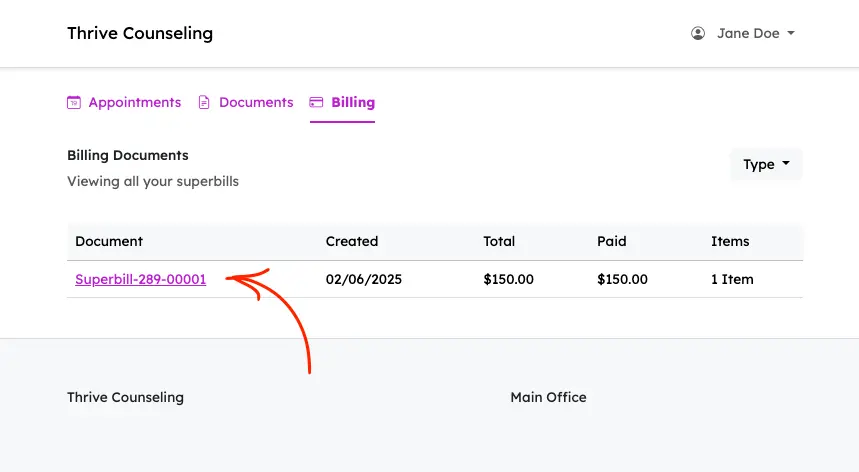
- Automatic charges and receipts after appointments
- Invoices, statements and superbills
- Good Faith Estimates and outstanding balance reports
Client portal and paperless intake
Clients complete intake paperwork, sign consents, see their appointments and pay their invoices from the portal. Build intake packets once and send them with a click, or attach them to new appointment requests so they're done before the first session.
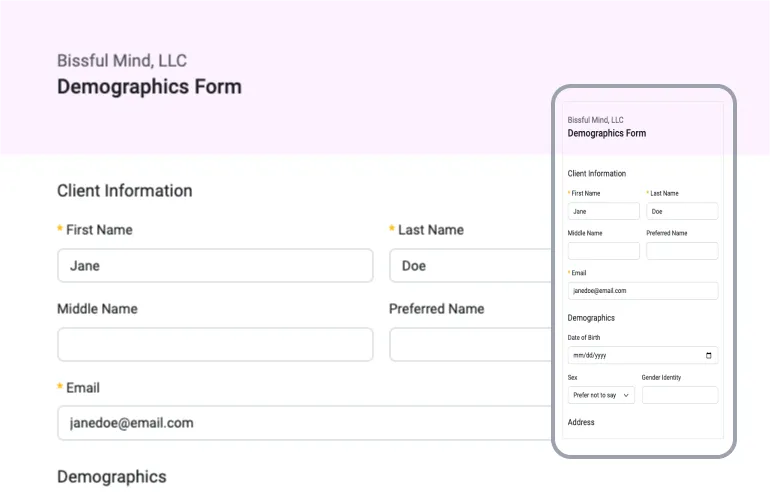
- Electronic signatures on consents and forms
- Secure messaging with clients
- Works on any device, no app to download
Built for the way your practice actually works
A lot of the therapists on Practicepicnic don't fit neatly into "one client, one 50 minute session." The system is set up for that from the start.
- Couples, families and groups. A "client" in Practicepicnic can be one person or several. Notes, invoices and telehealth sessions all understand this, so you don't have to work around it.
- Kids and minors. Parents or guardians get their own portal access and handle paperwork and payment on the child's behalf.
- Services outside psychotherapy. Coaching, consulting, supervision, workshops. Set up whatever services and prices you offer and bill them the way you need to.
- Group practices. Multiple clinicians, practice managers, supervisors and per-clinician client access. Solo practices get the same features at the same price.
Support from people who know the product
Unlimited email and phone support is included. During support hours (Monday to Friday, 9am to 5pm US Eastern) we usually reply within a couple of hours. Every new practice gets a one-on-one onboarding call if they want it, and we'll help you set up templates and forms so you don't have to rebuild them from scratch.
Side by side
| SimplePractice feature | Practicepicnic |
| Calendar and scheduling | Yes |
| Appointment reminders (email and text) | Yes |
| Online booking and appointment requests | Yes |
| Client portal | Yes |
| Paperless intake and e-signatures | Yes |
| Telehealth | Yes, built in ($10/clinician) or use Zoom, Meet, Doxy.me |
| Group and couples telehealth | Yes |
| Progress notes and custom templates | Yes |
| Treatment plans and diagnoses | Yes |
| AI note drafting | Yes, AI Notetaker included at no extra cost |
| Invoices and cards on file | Yes |
| Out-of-network superbills | Yes |
| Good Faith Estimates | Yes |
| Multiple clinicians and supervisors | Yes |
| Calendar sync (Google) | Yes |
| Mobile access | Yes, any device |
| Reports (revenue, income allocation, outstanding balances) | Yes |
| Electronic insurance claims | No. Private pay only (superbills instead) |
How the switch works
People switch to us from SimplePractice often enough that we built a dedicated import tool for it. It's under Settings → SimplePractice Import in your Practicepicnic account, and it's the reason we can say a day instead of a week. Here's what a typical switch looks like.
1. Request a free trial
Email us at support@practicepicnic.com and we'll set up your 30 day trial account, usually within the hour. No card required, and nothing you do in the trial is thrown away when you subscribe.
2. Run the SimplePractice import
The import tool walks you through three steps: Clients, Appointments and Documents. For each one, a short video shows you exactly where to click in SimplePractice to get the export, and you upload what SimplePractice gives you. Your files are checked in your browser as you go (we'll tell you if you grabbed the wrong report or forgot to uncheck the password option), and your progress saves after each step, so you can stop and come back.
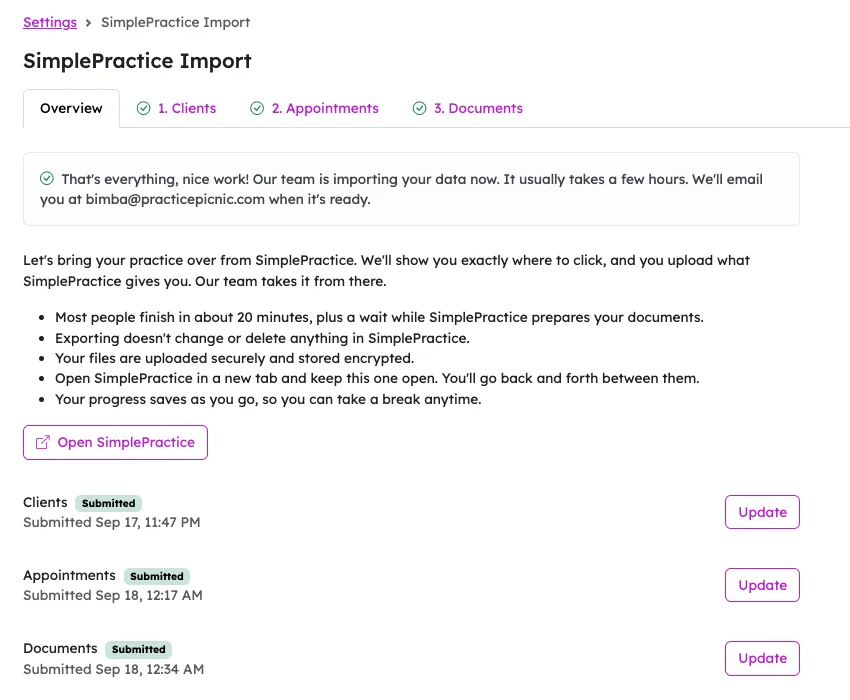
Most people finish their part in about 20 minutes, plus a wait while SimplePractice prepares the document export. Exporting doesn't change or delete anything in your SimplePractice account.
3. We import your data
Once your uploads are in, the import runs automatically. It usually takes a few hours, and we check the results before it's marked complete. You'll get an email when everything is ready.
Here's what comes over:
- Client records. Names (including preferred names), dates of birth, contact info, addresses, and active, inactive or archived status.
- Couples and families. Clients who share a file in SimplePractice come over grouped together, so their notes and billing stay together.
- Progress notes and psychotherapy notes.
- Treatment plans and diagnoses. Diagnoses are matched to ICD-10 codes and attached to a treatment plan on the client's file.
- Intake forms, consents and questionnaires, including signed ones.
- Uploaded files and stored documents.
- Billing history. Invoices, superbills and statements.
- Appointments, past and upcoming.
And what doesn't:
- Saved credit cards. No EHR can hand these to another for compliance reasons. Practicepicnic sends clients a secure card form to re-enter their card, which takes them about a minute.
If you need more help, we can do the import together on an onboarding call. Just ask.
4. Start seeing clients
Once the import is done, your clients, notes and forms are in place. The remaining setup is the same as any new system: connect Stripe, set your availability, send portal invites and card forms. Most practices are seeing clients on Practicepicnic the very next day, and your SimplePractice account is still there untouched if you need to look anything up while you get settled.
These practices switched from SimplePractice
Don't take our word for it. Here's what a few practices that made the switch have to say.
Ready when you are
The best way to see if Practicepicnic is a fit is to try it with your own data. Request a free 30 day trial by emailing support@practicepicnic.com. We'll have your account ready within the hour, and you can run the SimplePractice import whenever you're ready. No card required.
If you'd rather see the system first, you can schedule a 30 minute demo. We'll walk through it with your practice in mind and answer whatever questions you have about moving over.
Have a question that isn't answered here? Same address: support@practicepicnic.com. A real person will reply, usually within a couple of hours.